Most WordPress sites do a surprising amount of work for every visitor. A page is requested, PHP wakes up, the database is asked a string of questions, the theme and page builder assemble the result, and only then does anything appear on screen. Caching helps, but the machine behind it is still WordPress: still reachable, still on the hook. We think there’s a better way, and it’s called static WordPress.
PressEdge is a new plugin from J36 Digital that turns a WordPress site into static HTML and serves it from Bunny.net’s global network, while WordPress carries on quietly in the background as your private editing site. You edit exactly as you do now. Visitors get pre-built pages, delivered from the edge.
One honest note before we go any further: PressEdge is in its infancy. It already runs on a handful of our own sites, including j36.digital, but features are being added daily and the roadmap is as long as your arm. Here’s what it does today, why we’re excited, and where the rough edges still are.
What is PressEdge?

PressEdge is a WordPress plugin that crawls your site, saves every page as a plain HTML file (along with its images, scripts, styles and linked PDFs) and uploads the result to Bunny Edge Storage. Your real domain points at Bunny, so that’s where visitors are served from. WordPress itself stays on a private address that only you and your team use.
It began life as a fork of the open-source Static Porter plugin, and we’re grateful to its authors for the foundation. Since then most of the crawling, publishing and admin code has been rewritten, Bunny.net has become the one deployment target, and the whole thing is released under the GPLv2, just like WordPress.
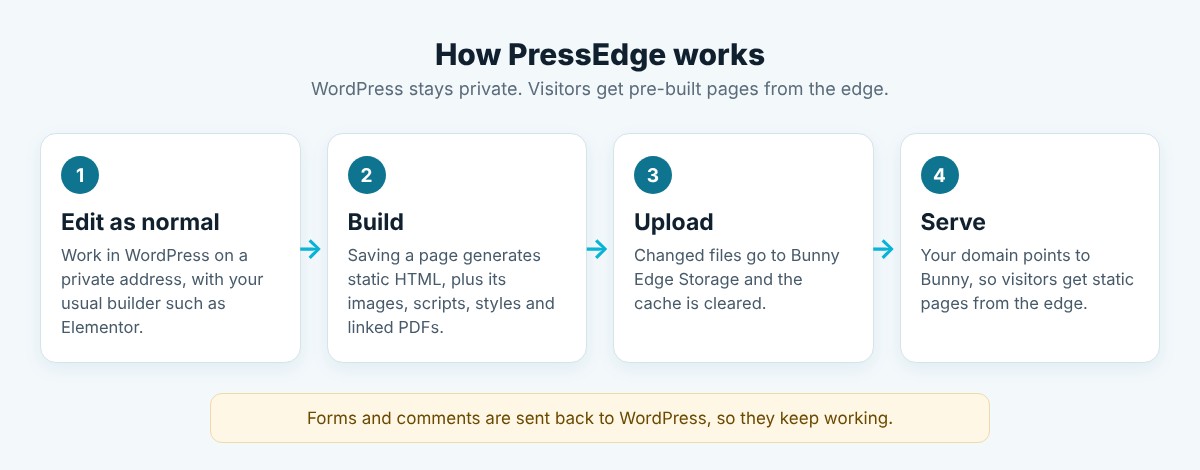
How PressEdge works in four steps
- Edit as normal. You work in WordPress on a private address, using your usual builder, such as Elementor.
- Build. Saving a page generates static HTML, along with everything it needs.
- Upload. Only the files that changed go to Bunny Edge Storage, and the cache is cleared.
- Serve. Your domain points to Bunny, so visitors get the static pages from the edge. Forms and comments are sent back to WordPress, so they keep working.
Why static WordPress, and why now?
WordPress is brilliant at the editing side: familiar, flexible and backed by a huge ecosystem. The trouble is that it’s built to assemble every page on demand, which is overkill for the many sites whose pages change once a week, or once a month. A static WordPress site keeps the editing and drops the on-demand assembly.
Doing that by hand has always been fiddly. You export the site, upload the files, remember to repeat it after every edit, and then discover that your contact form no longer works. PressEdge automates that whole loop and takes care of the awkward bits, such as forms, comments, redirects and sitemaps, so static WordPress becomes something you can run on a real business site rather than a weekend experiment.
The major advantages of PressEdge
Here are the things we think PressEdge gets right.
1. Speed: the page is already built
A normal WordPress page has to be assembled whenever it isn’t already cached. A PressEdge page is already finished. Visitors get a ready-made file from Bunny’s network instead of waiting on PHP and the database, so there’s far less between the click and the content. Quicker pages feel better to use, and Google’s Core Web Vitals reward them. We won’t throw made-up benchmark numbers at you here; we’d rather publish proper before-and-after figures once we’ve gathered enough of them. What we can say is that the design takes the slowest part of WordPress out of the visitor’s journey.
2. Security: far less to attack
Visitors browse static files, so WordPress isn’t generating pages for them and your editing site can be locked down. PressEdge can hide the editing site’s front end from the public, keep it out of search results, and close off XML-RPC and the public list of users while the lockdown is on. Bunny credentials are encrypted before they’re stored, and PressEdge’s own updates are signed and checked before they install. It isn’t magic, though. Forms and comments still go to WordPress, so keep it updated as you always would.
3. Resilience: pages stay up when WordPress doesn’t
Because the public pages are files on a content delivery network, they keep being served even if WordPress is busy, mid-update or briefly unavailable. A traffic spike, a plugin update that goes sideways or a hosting wobble doesn’t take the public site down with it.
4. Lower load on your hosting
Your host no longer handles every page view. It handles you editing the site, and the odd form or comment. That leaves far more headroom on the server for the work that genuinely needs WordPress.
5. Keep WordPress and Elementor exactly as they are
Nobody has to learn a new editor. Your permalinks don’t change, so visitors and search engines see the same clean URLs. Elementor forms keep working, and PressEdge detects Elementor popups, menus and lightboxes. Most of the sites we build use Elementor, so that was a hard requirement from day one.
6. Automatic publishing that doesn’t need babysitting
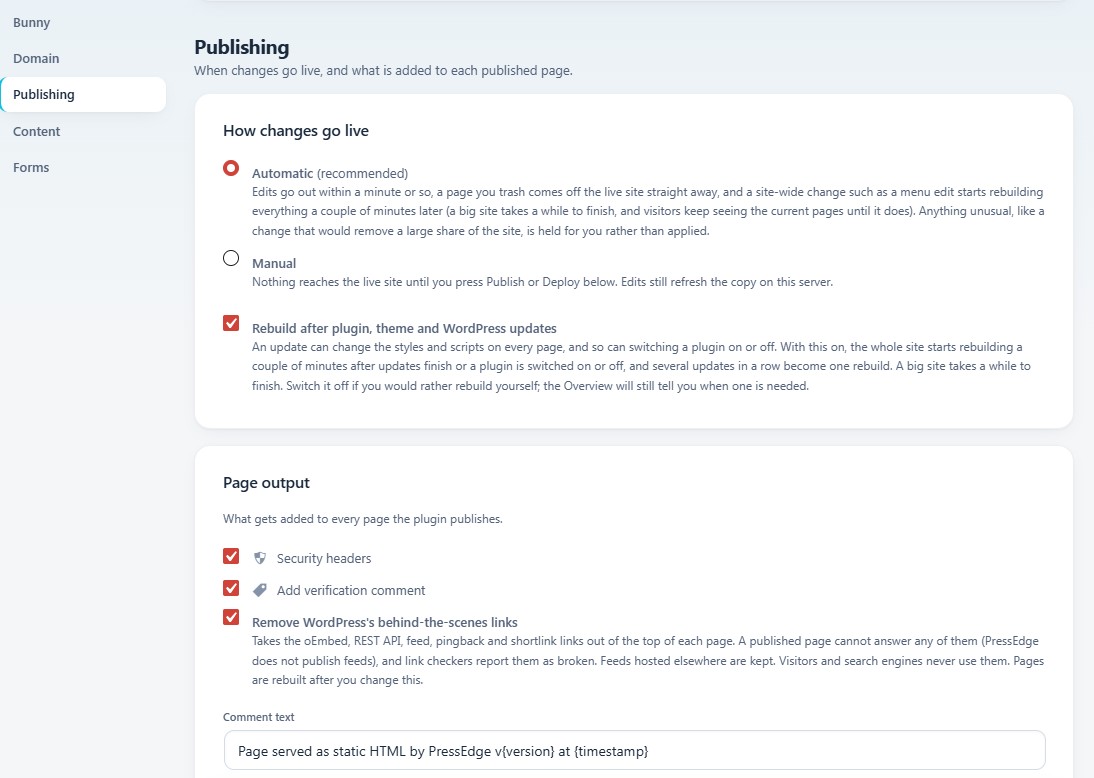
In Automatic mode, edit a page and it’s regenerated, uploaded and purged from the edge within about a minute. Trash a page and it comes off the live site straight away. A site-wide change, such as a menu edit, a theme change, a plugin or WordPress update, or even switching a plugin on or off, starts a full rebuild a couple of minutes later. A big site takes longer to finish (around 100 pages can take about 20 minutes), and visitors keep seeing the current pages until the new ones are ready. Prefer to be in control? Manual mode holds everything back until you press Publish.
There’s a safety net too. If a change would remove a large share of the live site, PressEdge holds it for you to review rather than applying it.
7. Guided setup
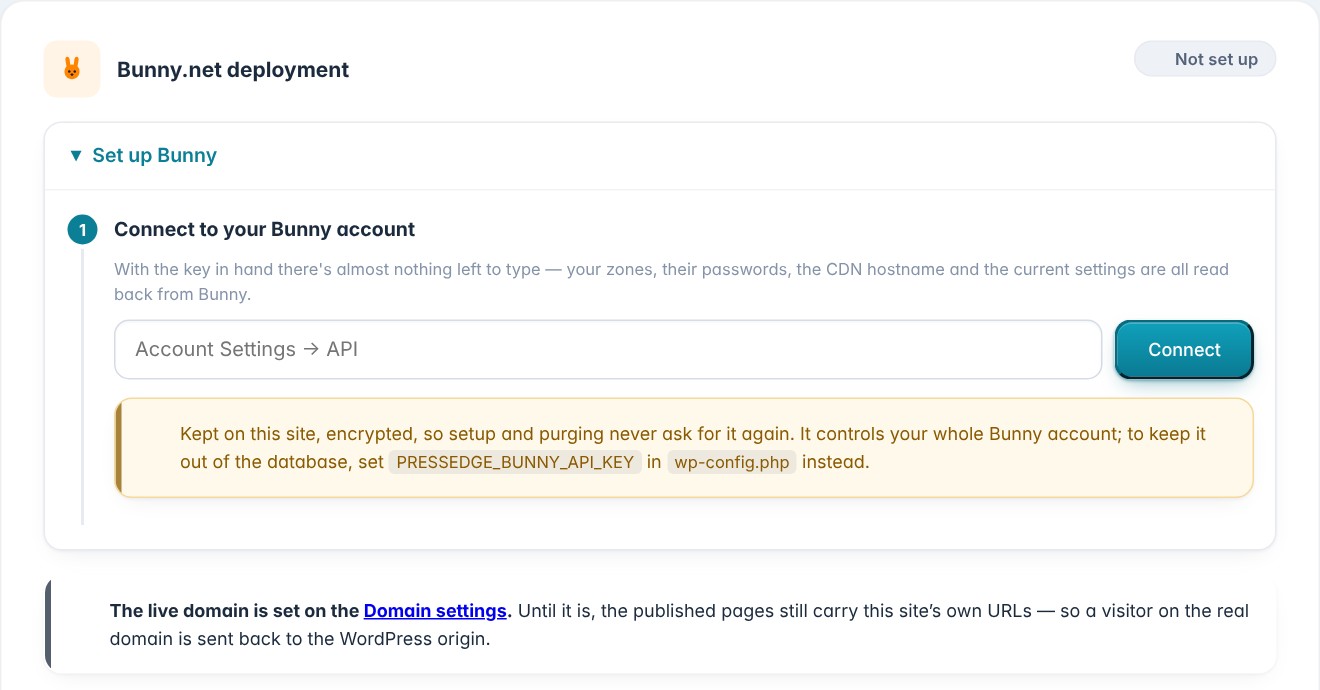
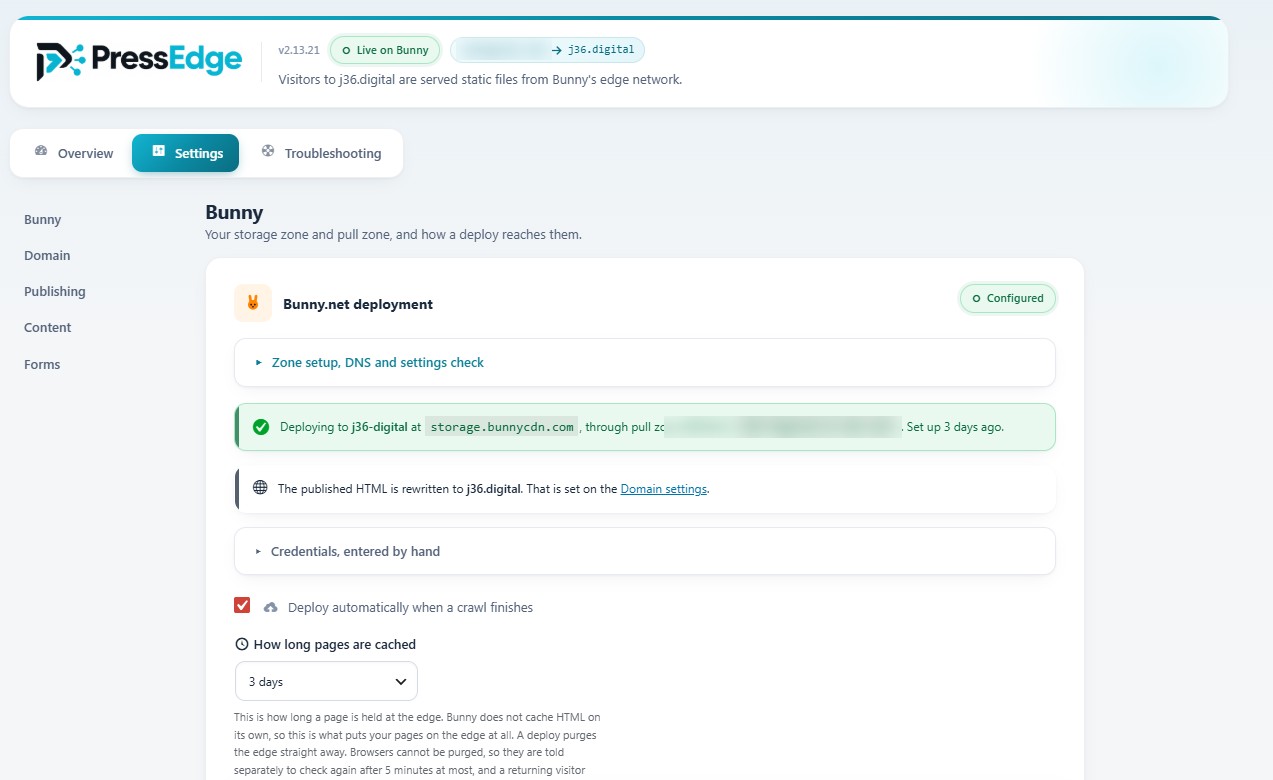
Activate the plugin and a setup wizard walks you through connecting Bunny, setting the live domain, choosing how changes go live, running the first publish and pointing your DNS. Paste in your Bunny account API key and PressEdge reads your zones and settings back from Bunny, so there’s very little left to type. It handles the storage zone, pull zone, domain, certificate, HTTPS and www redirects, and you can leave and come back at any point.
8. Static WordPress that’s built with SEO in mind
A fast site is only half of SEO, so PressEdge looks after the rest. It generates your robots.txt and sitemaps (and refreshes them when you publish), serves your theme’s own 404 page for unknown URLs, and carries your Rank Math redirects over. If any pages are set to noindex, the Overview points them out so nothing disappears from Google by accident.
It also tidies the head of every published page. WordPress adds oEmbed, REST API, feed, pingback and shortlink links that a static page can’t answer, and a link checker will report them as broken. We found that out the hard way when a dead-link report listed a dozen 404s on one of our own sites. PressEdge now removes those links (it’s the “Remove WordPress’s behind-the-scenes links” tickbox in the Publishing screenshot earlier), and you can switch that off if you’d rather keep them.
9. You can see what’s happening
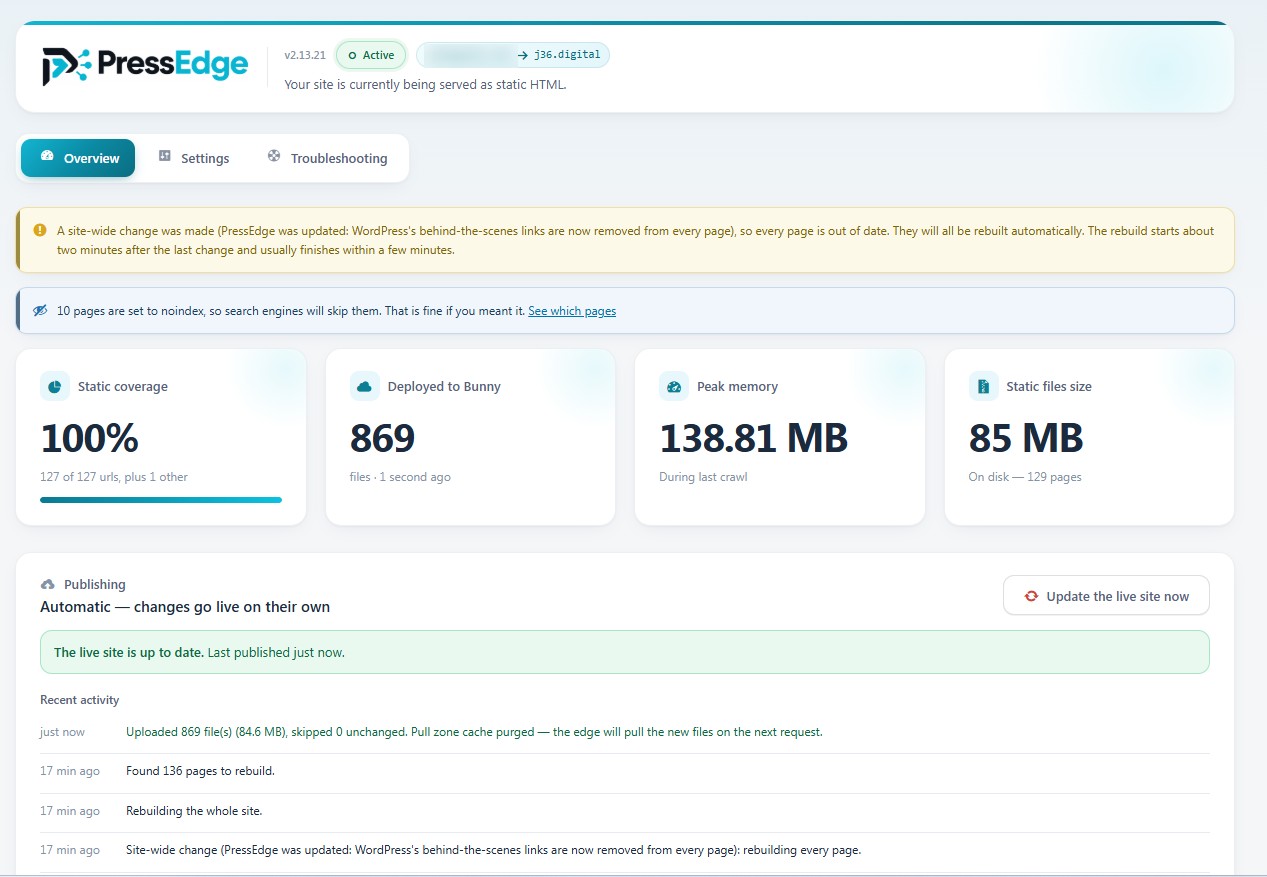
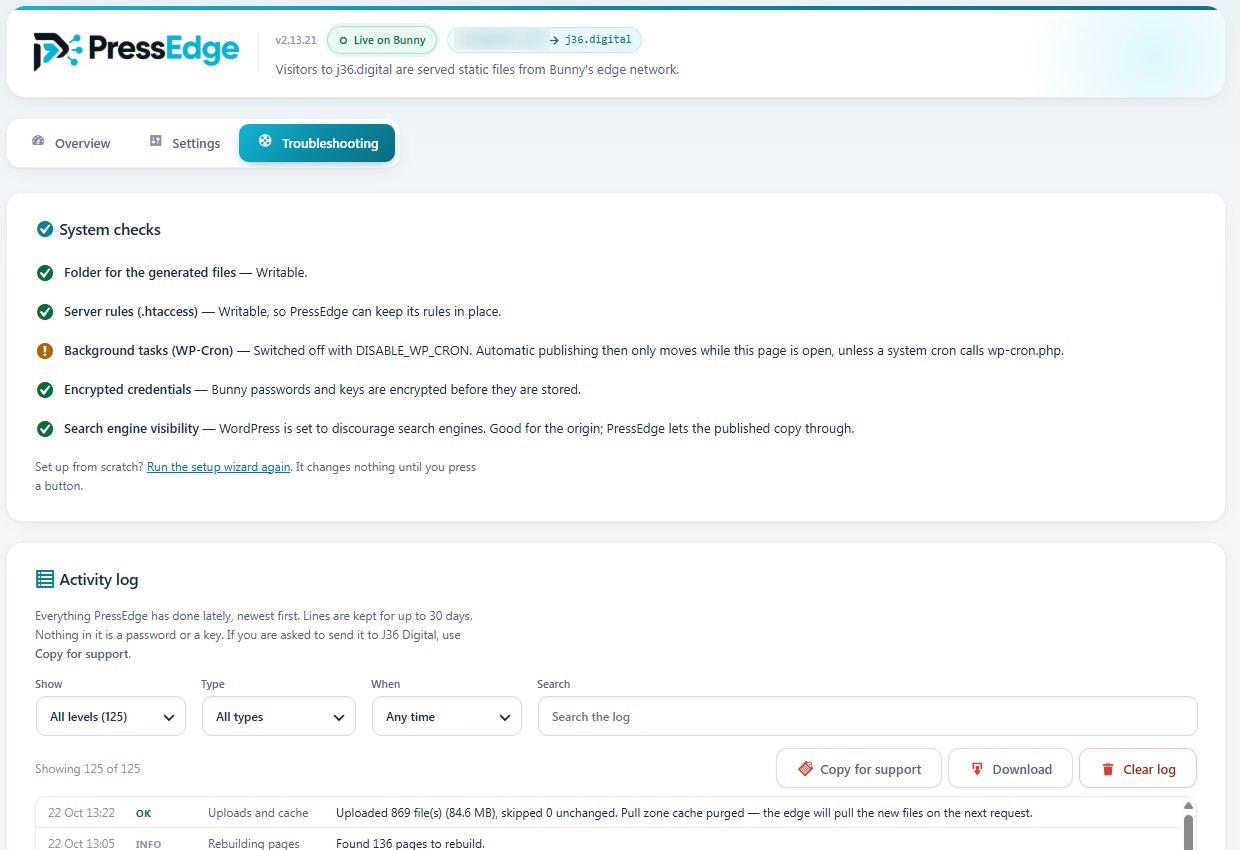
The Overview shows how much of your site is static, how many files are deployed to Bunny, how much memory the last crawl used and how big the static copy is on disk. It also reads Bunny’s statistics, so you can see requests, data delivered, cache hit rate, origin response time and top countries for the last 24 hours, 7 days or 30 days. Underneath sits a plain-English activity log, which is handy when you want to show a client it’s actually working.
What PressEdge can’t do (yet)
A static WordPress site can’t do anything that needs the server to think about each individual visitor. Site search and member areas are the obvious examples, and they’ll need to stay on WordPress. WooCommerce and Bookly support are on the roadmap, but they aren’t here today, so a shop or a booking system isn’t a good fit for now.
There are a few requirements, too. You’ll need WordPress with pretty permalinks, PHP 8.3 or newer and a Bunny.net account. We’ve tested it on LiteSpeed hosting. If your site is mostly a brochure, a blog, a portfolio or a local business site, you’re in the sweet spot.
Still in its infancy, and changing daily
We’re being deliberate about this. PressEdge isn’t open to everyone yet because we’d rather put it on more of our own sites first and get it right than rush out a general release. That means it’s changing quickly. In the past few days alone, we’ve made the published sitemap update as soon as you publish a post, taught PressEdge to notice site-wide changes it used to miss (the site title, widgets and block-theme templates, for instance), stripped the dead links from the head of each page, and made it rebuild automatically when a plugin is switched on or off.
That last one came straight from our own work. We’re retiring a plugin that was doing CDN rewrites on our PressEdge sites, and realised the published pages would keep its old output until someone remembered to rebuild. Now PressEdge does it for you. Expect plenty more of that, because every real site we move over teaches us something.
How PressEdge fits with J36 Digital hosting
Our WordPress hosting runs on a custom LiteSpeed build with UK-based servers, 100% renewable energy, daily off-site backups and a free QUIC.cloud CDN. PressEdge doesn’t replace any of that; it gives us another way to deliver a site when speed and security are the priority. The WordPress editing site still lives on our hosting, and PressEdge publishes the static copy out to Bunny. If you’d like the background on how we think about hosting, our guides to cloud hosting and DDoS protection are a good place to start.
Is PressEdge right for you?
PressEdge is a good fit if:
- you run a brochure, blog, portfolio or local business site and want it fast and hard to attack
- you build with Elementor and don’t want to change how you edit
- you manage several WordPress sites and want less to patch, monitor and worry about
- you’re comfortable being an early adopter of a young product
It’s not the right tool yet if your site depends on a shop, bookings, site search or a members area.
Join the PressEdge waitlist
We’re opening PressEdge up soon. If you’d like to be among the first to try it, join the waitlist on the PressEdge page and we’ll be in touch. Got a question, or a site you’d like us to look at? Get in touch and we’ll happily talk it through.
PressEdge FAQs
Can I install PressEdge today?
Not quite. PressEdge is in its early days and opening up soon, so the best way in is the waitlist on our PressEdge page. We’re running it on our own sites first.
Will my URLs change?
No. PressEdge follows your existing permalink structure, so visitors and search engines see the same URLs as before.
Will my forms and comments still work?
Yes. Elementor forms and comments are sent back to WordPress, which handles them as usual, so they carry on working on the static site.
Do I need a Bunny.net account?
Yes. Bunny is where PressEdge publishes your static pages, and the setup wizard connects to it for you.
Does it work with WooCommerce?
Not yet. WooCommerce and Bookly are on the roadmap.